
- Adhesive Graphics
- Banners & Flags
- Custom Flags
- Displays
- File Preparation
- Indoor Banner Stands
- Large Format Posters
- Rigid Signs
- Signs & Banners
- Table Covers
- Vehicle Magnets
- Wall Art
No tools are required and frames can be easily assembled.
For contour cut orders, two separate files must be uploaded: One regular artwork file, and one cut mask file. The cut mask file must be an all vector, PDF file uploaded at the same time as the artwork file.
We cannot accept any cut files that are made using a raster based program (e.g. Photoshop).
- When being cut, the blade will follow the cut mask line you’ve created. It is recommended that you keep your perimeter but line slightly inside the boarder of the image you are trying to cut out. This will avoid any obvious edges showing from your background once it is cut.
- Do not use small/thin cut areas, or have perimeter cut lines that are too close together. At least 0.5″ must separate your perimeter cut lines from each other. ArtShed will not reprint any order with perimeter cut lines that are too close to one another.
- Your contour cut line should be a smooth fully closed path. No disconnected lines or open paths will cut. If your cut line is ragged or has any imperfections, they will show up in the final piece.
- Only one cut per order will be allowed. Please do not add multiple cuts in a single file
- ArtShed will not reprint any order attributed to improper file setup or layout.






- Booklets
- Calendars
- Counter Cards
- Envelopes
- Event Tickets
- Greeting Cards
- Letterheads
- Marketing Products
- NCR Forms
- Postcards
- Presentation Folders
- Social Cards
We require a 0.5 inch bleed on all sides. If ordering at 8.5" x 11", your file size should be 9.5" x 12" with bleed.
Postcards can be mailed with 1/8" (0.125") radius corners only and are available with ArtShed Mailing services at an additional cost.
Announcement Cards can be mailed with 1/8" (0.125") radius corners only, but ArtShed Mailing services are not available for these products.
Cards with 1/4" (0.25") radius corners can be mailed in an envelope.
See USPS regulations at the following link: https://pe.usps.com/text/dmm300/201.htm#wp1042477
Yes, Offset Letterheads can be imprinted on with inkjet and laser printers.
NCR Forms are the modern alternative to carbon paper and are an efficient way to provide multicolored copies of a single document with handwritten or typed information. Use them as order forms, packing lists, invoices, receipts, and more.
They're available in 2 Part (White, Canary) and 3 Part (White, Canary, Pink) collated sets that are glued on the short edge. NCR Forms are printed on 20LB stock on high tech digital equipment.
Yes, NCR forms come collated in 2 Part or 3 Part sets. They come in 2 Part (White, Canary) and 3 Part (White, Canary, Pink) forms and are glued on the short edge.
Our NCR forms can be imprinted on variety of equipment, but we recommend you test your specific application.
NCR Forms are available with full color (CMYK) print on each sheet or as one color, 1/0 (K). We only accept one artwork file which will be printed on all parts of the NCR Form.
The 1/0 means black ink only. Files not submitted as grayscale will be converted to grayscale and the conversion might result in print issues.
NCR Forms are commonly used for order forms, packing lists, invoices, applications and receipts. They are particularly useful when information must be written by hand.
- Full bleed is not available on NCR Forms
- At least 0.25" of space on the glued edge (short edge) should be free of ink
- Full color and solid colored backgrounds are not recommended, as it may effect your ability to read the text and write on the form
- Light ink coverage is highly recommended
A wrap around cover is a protective cover that is attached to the top back of the NCR form which then wraps around it, coming back up and all the way to the top in the front.
No, we do not offer printing on the wrap around cover.
The 2 part forms will come as books of 50 quantity.
The 3 part forms will come as books of 35 quantity.
You would need 0.75" on top. Anything within this area will be covered. Use our template to make sure everything prints the way you want.
For a Presentation Folder please download our templates, it is important to note that they are printed flat.
The designation of the pockets is based on the flat images so when choosing pockets be mindful of this.
IMPORTANT – Please follow this rule when choosing slits, keep any design, text or logos out of the slit areas. The pocket side you want the slits on should follow the orientation rule shown in our templates.

Cracking is normal when coated jobs are scored and folded. Ordering the job without UV will help but may not prevent this. As the job is used and folded more and more, cracking will eventually happen. For black ink or dark designs the higher the ink density, the more likelihood of cracking.
Yes, when selecting 4/4 the uploader will require two files, here is where Front will designate the cover and back cover of the final piece and Back will be considered the inside of the folder.
No, please use our template to design the art but remove and do not include guides for slits, if a template is sent as a layer on the art it will print.
For a greeting card, please send your artwork as shown in our Greeting Card templates.
You will be able to choose envelopes as an extra option.
Steps to create a Multi-Page PDF file:
- On a Mac:
- 1) Open the PDF file that will be on the first page of your multi-page PDF file in Preview.
- 2) Choose View and click Thumbnails to show page thumbnails in the sidebar.
- 3) To indicate where to insert your next PDF file, select a page thumbnail.
- 4) Choose Edit, choose Insert, choose Page from File and click the PDF that you want to add, then click Open.
- 5) To save, choose File and click on Export as PDF.
- On a PC:
- 1) Open Adobe Acrobat.
- 2) Choose Tools > Combine Files.
- 3) Click Combine Files > Add Files to select the files documents to compile.
- 4) Click, drag, and drop to reorder the files and pages. Double-click on a file to expand and rearrange individual pages. Press the Delete key to remove unwanted content.
- 5) When you're done, click Combine Files.
- 6) Save the new compiled document.
The drill hole (applies to all diameters) begins 0.1875" from the edge of the page. Please note: the drill hole is at the bottom of the sheet for odd pages and on the top of the sheet for even pages. We recommend that you use our templates to ensure that no text is in the drill hole area.
The coil for spiral bound calendars is a durable metal and is available in black only.
100lb Book = 1/4" (both 26 & 38 pager)
100lb Cover = 5/16" (both 26 & 38 pager)
Yes. We will send a PDF Proof to the email address on your account. The PDF proof will show an example of one address on your artwork. Reply to the email with your approval by mentioning 'Okay to Print As Is' or request revised files to be uploaded. Revised files will be processed and a new proof will be sent for your approval.
The Variable Addressing portion has a default font of 12pt Arial, black only.
Note: if your csv data file contains extremely long names or addresses, the font will automatically be resized to fit the addressing area, but will be no smaller than 9pt type.
We offer several envelope size options printed on 70lb White Premium Uncoated Text or 70lb Natural White.
We cannot guarantee the quality of inkjet printing on Envelopes with Variable Addressing, so it is not recommended.
Artwork file formats: We recommend pdf. You may also send the following types: jpg.
Data file formats: We accept csv (comma delimited) format only.
On the csv file, the header columns should be labeled exactly as follows:
column A: FULL NAME
column B: COMPANY
column C: ADDRESS
column D: SUITE/APT
column E: CITY STATE ZIP CODE
No. ArtShed does not proofread nor flag or correct errors. It is your responsibility to double check and ensure the validity of your data. Invalid addresses, typos, misspellings, inaccurate zip codes etc. are not the responsibility of ArtShed.
For envelope variable addressing orders: ArtShed will print the artwork you provided for the full run size ordered. Variable addresses will be printed for each record in your CSV data file. The entire job, with addressed and non-addressed envelopes will be carton packed and delivered via the chosen delivery method.
For NCR Forms with Variable Numbering: ArtShed will print the artwork based on your data file. For example if your run size is 500 and your data file has 450 records, we will only print 450 NCR Forms with Variable Numbering.
If your data file contains more records than the run size you ordered, you will be notified and asked to either upload a revised CSV data file with less records or you will be asked to cancel the order and place a new order for the next available run size higher than the number of records.
For Event Tickets and NCR Forms: ArtShed will print the full run size ordered. If your CSV Data File contains more records than the run size ordered, ArtShed will not print those additional records.
Yes. We will email a PDF Proof to the email address on your account. The PDF proof will show an example of one event ticket on your artwork. Reply to the email with your approval by mentioning 'Okay to Print As Is' or request revised files to be uploaded. Revised files will be processed and a new proof will be sent for your approval.
The default font for the Variable Numbering portion is 14pt Calibri, black ink only. Black ink for the numbering should be taken into consideration when designing your artwork file. If your background images are dark, you may need to KO (knock out) the background image in the numbering areas, so that the numbers are visible.
Note: The CSV data file may contain up to 5 digits or characters for each record.
Artwork file formats: We recommend pdf. You may also send the following types: jpg.
Data file format: We accept csv (comma delimited) format only.
Note: The CSV data file may contain up to 5 digits or characters for each record.
In order to preserve leading zeroes on your Variable Number CSV file (e.g. 001, 0001) please Format the Cells as Text before creating your numbered list.
To include leading zeros: Right-click (or control click) on the first few cells, then Choose Format Cells > Text or Plain Text. Once your cells are formatted, proceed with creating your numbered list. You should be able to see your numbering correctly before saving your document.
Note: If you close and reopen your document or look at a preview of the document, it will appear that the CSV has reverted and your leading zeroes were deleted. However, be assured that is not the case. As long as you were able to see the leading zeros at the time you saved the document, your CSV has the leading zeros. It is safe to upload your CSV and your leading zeroes will be preserved.
When designing plastic cards, it is important to keep in mind that the frosted and clear plastic cards are transparent. Also, all plastic cards come with round corners at no extra charge.
The clear cards are completely transparent. The frosted cards are semi-transparent and cannot be seen through easily. The opaque white plastic cards are solid white and not transparent at all. Keep this in mind when designing your plastic cards, it will affect how your design will print.
Printing on Clear and Frosted Plastic Cards will come out slightly lighter than average compared to other stocks. This is due to the plastic itself and is not a production issue.
When setting up a rich black value, please make sure to use C 60 M 40 Y 40 K 100 . Do not use all 100 since it will cause problems and will not print any darker on plastic.
Since there is no white ink in CMYK, the frosted and clear plastic cards are transparent. The white area in the clear cards and the frosted cards has no ink and will show the transparent material it's printed on. Also, keep in mind that all colors that are printed on clear cards or frosted cards will be transparent as well.
With the clear plastic cards, there might be a small percentage that may have light scratches. This issue originates from the manufacturer and is due to the material and handling. To help compensate for this, we run overs of the clear plastic cards to help meet the required quantity.
Clear plastic cards will come with a thin protective layer on one side that can be peeled off. This is to prevent the cards from scratching during packaging and shipping.


Booklets are a little more complex to design. Also, if you have artwork you created from another company, it might not meet ArtShed rules. For best results, please download our templates.
Here are rules to follow when creating your Booklets:
- Page counts start on the cover as page 1, inside cover as page 2 and so on.
- Total bleed is .25" and total Safety is .5". For example, an 8.5×11 booklet with bleed should be 8.75×11.25 total. This allows us to set up your crossovers properly.
- Only single pages will be accepted. NO readers OR printers spreads.
- We prefer a multipage PDF but single page files are also ok.
Our page counts for booklets start on the cover as page 1, inside cover as page 2 and so on. In the example below, you will see a 8pg booklet. Each page will show the page number. Click and hold the page corners to turn the page. This is also reflected in our templates.

Crossovers are common in booklets and require extra attention. A Crossover is an image, text or other graphic element that goes from one page to another.
Below you can see a good example of how to create crossovers:

Designers must pay close attention to the crossover design and make sure it is as seamless as possible on the finished piece. Also, do not use text or thin lines as crossovers. Big pictures work best.
Note: Due to the nature of saddle stitch binding, crossovers may not line up 100% on the final booklet.
Artwork done in Indesign or other layout software as spreads or facing pages must be saved out as single page pdfs. When creating your design, keep this in mind especially when doing crossovers. The easiest way is to create the bleed is when creating your document. Below are instructions on how to create your document in Indesign.
When creating your document, make your page size the cut size and your margin size .25" for safety for a .5" total:

Then, click the More Options button on the right. It will reveal Bleed and Slug settings below. Enter .125" as the bleed for a total of .25":

Your Indesign document is now ready for proper booklet layout. You should see proper bleed and safety guidelines:

When your ready to export your booklet as PDF, make sure to Use Document Bleed Settings in the Marks and Bleeds menu:

After submitting your booklet, you will receive an email from our online proofing system. This system will allow you to double check all the pages and make sure they are in the correct order. There you can approve or decline and re-upload pages if you need to. You will also be able to preview your booklet as if it was printed and bound.
Yes. Landscape booklets are available by choosing Short Edge Binding from the drop-down menu Binding Edge.
Perfect Binding gives your booklets a more finished, refined look. With this binding method, the pages and cover are glued together at the spine with a strong, yet flexible, thermal glue.
Please note: Unlike our regular Booklets, the page count specified in the product name does not include the cover. E.g. "8.5 x 11, 52-Pages" will require you to upload 48 inside pages + 4-page cover file (which is always 4:0).
We recommend you do not specifically design on the spine. Backgrounds or images that wrap around the book are preferred. Creating designs with text, borders or colors that are centered only on the spine may cause it to look uneven during the binding process.
Templates are available for the covers of the Perfect Bound Catalogs and relate to the number of inside pages. The normal 8.5×11 and 8.5×5.5 flat, Flyer templates can be used for all the inside pages.
Digital Envelopes are pre-converted and printed on high tech digital equipment.
Offset Envelopes are printed on offset gang runs, then die cut and converted to envelopes.
Both are printed on 70LB Premium Opaque stock.
1/16" overbleed and color wrap onto the back of the envelope is required to allow for movement throughout the bindery process.
Artwork with bleed on face or print on any flaps must be placed on our certified envelope templates.
Solid, full color envelopes are recommended (to eliminate overbleed)
Intentional extension of flap color onto envelope face is recommended.
Gradients are recommended for smoother color transitions.
Please use our Envelope templates to make sure your artwork is set up to our guidelines. You can find templates under Resources or the Envelope Product Page.
For Digital Envelopes:
4/0 = Full Color Front
4/4 = Full Color Front and Full Color on Back Flaps
0/4 = Full Color on Back flaps
The bleed required is 0.125" (0.0625" on each side).
Text and images should be at least 0.25" from the edge.
Artwork with more than 40% ink coverage must be submitted as an offset product.
Full color backgrounds should be avoided.
Use a white background with low ink coverage (e.g. logo and text only).
Avoid or limit use of transparencies and gradients.
For window envelopes, the window area must be free of ink
Yes. To get print on the back flaps only, choose 0/4. For print on the front and the back flaps, choose 4/4. Keep in mind, artwork with more than 40% ink coverage must be submitted as an offset product.
4/0 = Full Color Front
4/4 = Full Color Front and Full Color on Back Flaps
0/4 = Full Color on Back flaps
Follow our certified templates for correct window placement.
DO NOT place artwork or color on the window area. Keep images at least 1/8" inch away from the edge of the window. Digital Envelopes are pre-converted and have a plastic window adhered to the window area prior to printing. The window area must be blank.
Security Tint Envelopes have a blue crisscross pattern on the inside of the envelope which distorts the message on the document enclosed within, which prevents the contents from being read or deciphered. For your convenience, they also come with a self adhesive strip.
We offer two variations of Gift Card Slits – Slide Slits and Moon Slits. You can choose from positioning the slits on the Inside Bottom Panel or on the Inside Right Panel. See attached illustration for a visual representation. Please be sure to use our templates.

- All elements, text and images that are not intended to bleed off need to be at least 0.25" from the cut line for safety
- Artwork should be provided with at least 0.25" bleed around
- Artwork can be submitted as one multi-page PDF (recommended) or as individual pages
Yes. You'll receive a free online proof within 24 hours of placing your order so you can review and approve your pages before your order is produced.
Spot UV is a flat finish of a shiny layer that goes on the exact spot where you would like your printed piece to have an area of a high gloss coating.
Raised Spot UV is the same process, except the UV that gets applied stands out from the product, that if you run your fingers over the card you will feel the UV. The depth of the Raised Spot UV is 50 microns.
It is recommended that you do not use smaller than 6pt font on the Raised Spot UV Artwork. If, however, you use fonts with thicker strokes, it is recommended that you do not use smaller than 9pt font.

For best results, please make sure that UV coverage is less than 30%. Otherwise, the cards will be stuck together and become a block of cards. Also, The mask file must be a vector art created in a vector-based program such as Illustrator. Otherwise, you won’t have sharp edges on the artwork.
Up to 70% coverage is acceptable only with patterns, thin strokes or small shapes. Ideally, the size of the area, shape or image covered with raised foil should not exceed 1in x 1in.
Please see the pictures below for reference.


1.What are Painted Edge Cards and how do I set them up?
2. Will my design/background color have any impact on how the edge color turns out?
Your design might slightly change the way the edge color turns out. This will be more noticeable with dark and light color backgrounds. We recommend having a solid background color. This difference will be more noticeable when the cards are stacked, but less noticeable once you hold up an individual card by itself.
We highly recommend having a solid color behind the foil mask. We do not recommend having any artwork or text under the foil mask since it might be visible through the foil mask. Knockouts are not recommended since there may be a shift (up to 1/16") when the foil is applied.
Foil Coverage should be no more than 30% of the artwork, otherwise the foil will be wavy and won’t look good. The only time a 50% coverage is acceptable is with patterns, thin strokes or small shapes. Ideally, the size of the area, shape or image covered with raised foil should not exceed 1in x 1in.
Foil Worx has a flat finish foil whereas Raised Foil has a raised foil finish, that if you run your fingers over the card you will feel the foil. The height of the foil is approximately 60 microns.
We do not recommend having fonts smaller than 10pt on the Raised Foil Artwork. However, if you use fonts with thicker strokes or bold fonts, we do not recommend having fonts smaller than 12pt.
Please see the picture below for reference.

Raised Foil cards are printed on 16pt card stock, laminated on both sides with 1.5mil scuff resistant, soft velvet laminate, which gives them a substantial thickness of 19pt.
Raised Foil jobs require a mask file. When creating a Raised Foil job, you must include a Raised Foil mask file along with the regular print file. The Raised Foil mask file is used to show where the foil needs to be applied.
Please note, the mask file must be a vector file created in vector-based programs such as Illustrator.
Please only use solid 100% black color (C 0%, M 0%, Y 0%, K 100%) to indicate where you would like the foil. Do not use shadows, glows or grayscale images. White will indicate no foil.
Knockouts are not recommended since there may be a shift (up to 1/16”) when the foil is applied.
We can only use one type of foil per order, for example, you can not order a Foil Worx job with Gold foil on the front and Silver foil on the back. Foil job files are set up just like our Spot UV job files. You must provide a separate Foil mask file: black in the areas you want the foil and white in the areas you do not want the foil. All black areas should be solid 100% K with no other added colors. If you order a Foil Worx job with Spot UV, you’ll need to provide separate mask files for the Foil (foil mask) and UV (spot uv mask) , in which case you may be required to provide up to 6 files. Please keep in mind, however, that the Foil and UV coating can’t overlap, both should be at least 1/16″ apart to avoid foil peeling off. Also, avoid using small / fine text or lines for foil objects. For best results, please make sure that foil coverage is less than 50% of the entire print side. Also, be aware that there may be up to a 1/16″ shift on the placement of the foil. Keep this in mind if you are trying to align foil with other printed artwork on the card.

For better quality we recommend creating mask files in vector based programs such as Illustrator or CorelDRAW.
With Akuafoil, you can turn a wide range of CMYK colors into multi-colored foils. Akuafoil uses a special processed foil system that is applied under a 4/c process to create an array of foil colors. It’s simple, affordable, and makes your prints stand out from the crowd.
For an Akuafoil job, you must include an Akuafoil mask file along with your CMYK file. The mask file indicates where the Akuafoil will be applied. The file setup is the same as Spot UV. Use 100% K where Akuafoil needs to be applied and white where the Akuafoil is not applied.

As shown above, the file on the left is the normal CMYK print file. If you want the logo to be Akuafoil, then your Akuafoil mask file should look like the file on the right. The white indicates no Akuafoil and black 100% K indicates where the Akuafoil will be applied. When uploading, please remember to upload separate files.
Here are some more things to keep in mind when creating your Akuafoil artwork:
Make sure the mask and CMYK print file are aligned. They should match exactly in size and position.
–Akuafoil works best on lighter colors. The darker the CMYK color, the less vibrant the Akuafoil effect.
–Do not use very thin or small text and artwork with Akuafoil. Use San Serif fonts above 12 point for best results.
–If you have Akuafoil applied to a white area, it will have a plain silver Akuafoil look.
–For better quality we recommend creating mask files in vector based programs such as Illustrator or CorelDRAW.
If you would like plain silver Akuafoil to print, make sure to have at least 15% K in the CMYK print file area in order to obtain the highest quality silver Akuafoil effect.

When creating knockouts in the Akuafoil mask or in the CMYK print file, please be aware that there might be a “Halo” of white around the knockout area. Below are two examples: On the left, a file with a CMYK magenta background and a knockout for the Akuafoil text. On the right, an Akuafoil background with a knockout for the CMYK text.

These are the printed results:

You can see the white “Halo” in-between the CMYK ink and the Akuafoil. To prevent this, grow/stroke the Akuafoil area in the mask by 1 point. This will allow the Akuafoil to bleed into the CMYK area, reducing the white “Halo” effect. You can also fill in the knockout with a color to reduce the effect further.
Our 14pt Metallic Pearl paper is a unique stock that shimmers in light when viewed from different angles. The stock itself is embedded with Pearl fibers that give the paper an overall smooth, metallic look. Printing on this stock will give your CMYK colors a subtle shimmer, however heavy ink densities or coverage may diminish the effect.
Our 14pt Natural Cards are a light cream, natural white color with a smooth finish. The stock has a minimum of 30% post-consumer waste content. Samples are available in our ArtShed Trade Printing Sample kit.
EDGE Cards are made of three premium quality stocks adhered together creating an ultra thick, 32pt triple layered card with a colored core.
Face Stock: 9pt Bright White Premium uncoated with a Smooth finish
Insert Stock: 14pt Premium Opaque Black
Yes, EDGE Cards are made of premium uncoated paper and are easily written on. We suggest you test your specific application.
EDGE Cards are made to last for years under normal conditions. Cards exposed to exceedingly high temperatures will have undesirable results. For example, if one were to expose these cards to a very high heat for extended periods of time, like in the windshield of a car, the longevity of the cards will be compromised. EDGE Cards should not be exposed to excessive heat or cold, as well as excessively dry or humid environments.
We start with 16pt stock as a base and apply 1.5mil soft velvet, scuff resistant laminate to both sides of the sheet for a total thickness of 19pt. The soft velvet lamination adds a soft supple look and feel, which softens colors, reduces contrast and gives an overall lighter, muted appearance.
Suede Cards are water resistant, but not waterproof. This means the cards stand up well when they come in contact with a small amount of water, but cannot be submerged in water without water seeping into the card and causing damage. Please test your specific application to ensure the cards are appropriate for that use.
The term “Suede” refers to the soft, supple texture of the cards, not the actual materials used. A soft velvet laminate is applied to both sides of the card to achieve a luxurious suede-like look and feel.
We do not guarantee or recommend this, but If you would still like to use a different mail house, we suggest taking a sample of the product you will order to the mailing house for their approval.
No, Direct Mail Service is only offered on jobs printed by ArtShed. We cannot address or tab jobs produced by other printers.
No, Direct Mail Service is only offered to customers that want to use ArtShed’s permit.
*Provide nonprofit organizations CRID number or Authorization number provided by USPS.*Include the nonprofit organization name and address as the return address on the mail piece artwork. Organization name and address must match the name and address on file with USPS.
ArtShed can mail for a nonprofit organization that has an active nonprofit account with USPS.
You have the choice of shipping the remainders to default address on file, drop ship or have ArtShed recycle for them for you. *Local Delivery and Pick up options are available if you’re eligible.
Once production has completed addressing all mail pieces, remainders will be available to ship out.
We have 3 Validation options to select from:Accept All: We will mail to all addresses provided on the mailing list “As is” without running through validation tool.Most Popular: Exact duplicates will be removed from the list and some address validation will be applied.Exact Match: Only USPS approved addresses will be accepted and processed.
Postage rates are available on the website. Actual postage costs will be determined once the provided mailing list is processed.
No, postage is a separate charge.
AkuafoilBooklets up to 12 pgsFlyers and BrochuresLetterheadsPostcardsRach CardsSell SheetsSilk Cards
Our standard pricing includes a maximum of five (5) lines. Additional lines may require extra setup and setup fee. Please contact customer experience for details.
ArtShed has Mailing Templates available for download. The Mailing template includes position and dimension of address block and indicia.
You must allow 4” wide by 2.5” height of blank space for address and barcode. 1” wide by 1” height of blank space at the top right corner for the indicia/permit.

Mailing turnaround begins once the Validated Mailing List approval is received. Approvals submitted before the 1 pm (PST) deadline will be considered the first day of turnaround. Here are the turnaround times for mailing production:200 – 25,000 – 1 – 3 business day(s)30,000 – 60,000 – 3 – 5 business days65,000 – 100,000 – 5 – 7 business daysOnce ArtShed hands mailing order off to USPS, USPS assumes all responsibility for delivery to mailing list.Any delay, damage or loss occurring after delivery of your order to USPS is the responsibility of the USPS.Reprints, delays in proof approval or payment, or holidays will add additional days to your turnaround time.
Folded mail pieces are required by the USPS to be sealed. Required number of tabs will be applied and charged accordingly.
Direct Mailing Fee charges will be included in your sub-total at the end of your order process and these charges will be applied to the credit card you use to place the order.
Direct Mail Service fee is based on the print quantity of your order.
Data process of one mailing list ($25 for each additional list)C.A.S.S. Certification (Coding Accuracy Support System)N.C.O.A (National Change of Address)De-dupe listPre-sortingInkjet setup and addressingPost Office delivery
We accept CSV file format.
Download ourMailing List Templateto help with the csv setup.
Presorted First Class – minimum 500 piecesNonpresort First Class – minimum 200 piecesPresorted Standard – minimum 200 piecesNonprofit (Standard)- minimum 200 pieces
First Class MailPresorted First Class Mail:500 pieces required to qualify for Presort First Class.Post office delivery time is estimated 1 – 3 business days.Nonpresort First Class Mail:200 pieces to qualify for Nonpresort First Class.Post office delivery time is estimated 1- 3 business days.Nonpresort First Class is the same as placing a stamp on an envelope (no discount).USPS Marketing Mail (Standard)Presorted Standard200 pieces required to qualify for Presort Standard.Post office delivery time is estimated to be two weeks.Cheapest postage rate but longest delivery time.NonprofitNonprofit (Standard)200 pieces to qualify for nonprofit mail.Customers need to provide the nonprofit organization� CRID number or Authorization number.Return address on mail must have the nonprofit organization� name and address as it appears on file with USPS.Post office delivery time is estimated to be two weeks (same as Presort Standard).Uses a customer’s nonprofit account with ArtShed’s permit number.
First, enter a street address or zip code for the area you are interested in. The map will display all of the USPS carrier routes in a radius of 1 mile by default. You may expand the radius using the drop down menu on right above the map. Select different routes on the map by clicking on the route on the map, it will highlight to indicate it is selected. Deselect a route by clicking on it again. If you prefer, click List View on the bottom right, then use the check boxes to the left of each route to select or deselect the route. The list view panel shows the number of Residential and Business addresses on each route and income demographics. There is also a check box to choose Residential Only, if you prefer to exclude business addresses. This panel also shows the current total for your order, including postage based on the routes you selected.
PDF files are recommended. We accept the following file types: pdf, jpg.
For the Print Only option, make sure to download and use our EDDM Print Only templates and follow all standard USPS EDDM requirements. For more information, please visit: https://www.usps.com/business/every-door-direct-mail.htm
For the Full Service option, where we take care of the processing and delivery to USPS, make sure to download and use our EDDM Full Service templates. The templates include our indicia and guide for were to position the return address.
Indicia and Return Address Positioning:
our indicia and a return address must be on the artwork.
the indicia and return address must be on one side of the print piece.
the indicia and return address must be positioned in the top half of the artwork.
for 4/0 artwork, the indicia and address must be placed on the front.
Below is a sample of our full service template for the proper lay out of your artwork:

EDDM Print Only includes sizes and options which are USPS approved for EDDM processing. We print and ship to you just like a normal postcard. Be aware that artwork must include an approved USPS EDDM indicia, return address and must be designed within USPS EDDM specifications. Please visit the USPS website at https://www.usps.com/business/every-door-direct-mail.htm for more information.EDDM Full Service takes all the guess work out of the EDDM process. Choose your print product, then select your routes using our simple and easy online route selection map, then upload your artwork. We take care of the printing, bundling, EDDM processing, paperwork and delivery to USPS. The USPS postage fee is included in the final price at checkout.It is required that the artwork have our indicia on one side, so be sure to use our EDDM Full Service templates before uploading your artwork.
EDDM is a U.S. Postal Service program developed to help businesses get their promotions and advertisements into the hands of a targeted audience, while reducing the cost of preparing and delivering mailing campaigns.It’s the perfect solution for businesses large and small, allowing you to target homes in your area or across the country. No mailing list or postage permit is required, which saves you time and money. We have a Print Only option, where we print the pieces and you handle the rest of the process with USPS and a Full Service solution, where we take care of everything. With Full Service, postage is as low as 0.242¢ per piece, saving you a bundle over first class rates!Please note: EDDM orders must meet “commercial flat” specifications and all other USPS requirements. Our built in EDDM Full Service tool and our EDDM Full Service templates make these specifications easy to adhere to.
Cracking of the edges of a business card sometimes occurs when the card contains high of ink, as in dark colors.
CLOSE UP OF BUSINESS CARD
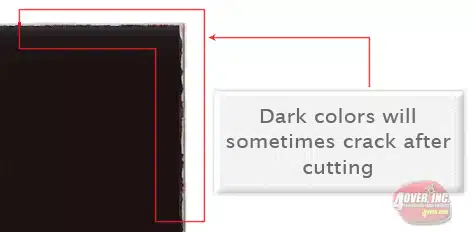
This usually happens on a small amount of cards in the run. To prevent this, use lighter colors or if you must use dark colors, use as little ink as possible.
Many things can cause banding. Banding can be caused by the program that it is exported from, such as Indesign or Corel. Also, too many gradient steps, for example going from a very light color to a dark color, in a small area will cause banding.
CLOSE UP OF BANDING

To prevent this, check your digital files before sending. If you use a gradient, make sure it has enough room for a smooth transition.
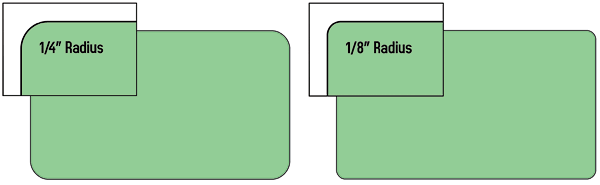
We offer 1/4″ and 1/8″ radius round corners to all of our customers. The image below shows the two different radiuses for comparison.
Counter Cards are supported by 5″ double-wing easel backs with an adhesive strip. Easel backs are applied and shipped flat. Final assembly is required.
Counter Cards are supported by 5″ double-wing easel backs with an adhesive strip. Easel backs are applied and shipped flat. Final assembly is required.
Rich black is an ink mixture of solid black, 100% K, with additional CMY ink . This results in a darker tone than black ink alone. If you print black alone as 100% K, the resulting black may not be as dark as you might like.
100% K ON SCREEN

100% K AFTER PRINT

We recommend using C 60 M 40 Y 40 K 100. This will give you a deep, dark, rich black.
*Products that are printed with dye-sublimation (9oz Premium Polyester Banner, Flags, Table Covers, Fabric Tube Displays, etc.) call for the following color :
C 100 M 100 Y 100 K 100
For designing Roll Labels, visit our FAQ page: https://trade.ArtShed.com/faq-roll-labels.php
When a job is coated with UV then scored and folded the job may begin to crack. During use, the cracks will become bigger and the ink may start to chip off.
CLOSE UP SCORING
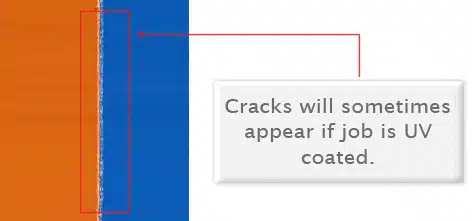
Cracking is normal when coated jobs are scored and folded. Ordering the job without UV will help but may not prevent this. As the job is used and folded more and more, cracking will eventually happen.
There are three different ways Pantone colors can affect the way your job prints.
The first is by object effects, such as shadows or glows, on top of your Pantone colors. Here is what the effects will look like on screen:
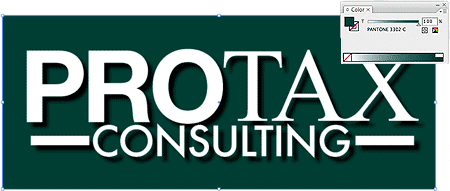
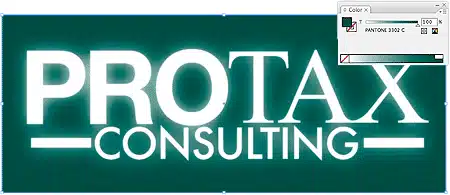
Here is what the effect looks like after printing:
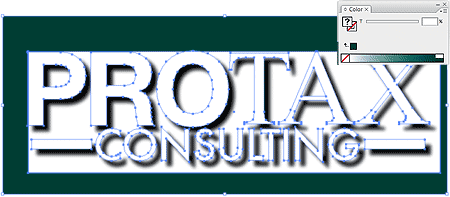
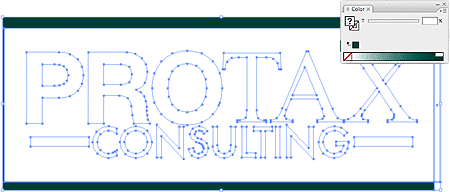
As you can see, when a Pantone color is under these object effects, transparency issues show up during printing. To avoid this, convert all your Pantone colors into CMYK before submitting your order.
The second way Pantone colors can affect your file is when you use transparent images. Here is what a transparent image looks like on screen:

Here is what a transparent image looks like after printing:

You can see the image is no longer transparent on top of the Pantone color. These white areas will show up during printing. To fix this issue, convert all your Pantone colors into CMYK. This must be done before submitting the order.
The last way Pantone colors can affect your order is the color conversion between a Pantone color and CMYK. If you use Pantone colors in a job that will print CMYK, your job might print with undesirable colors.
Here are some examples of what the Pantone color looks like in the Pantone color book and what the CMYK print will look like:
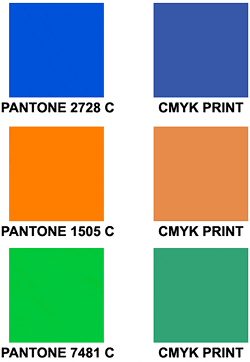
If you send in a job with Pantone colors, the CMYK conversion will change the Pantone color. Before sending your order, make sure all Pantone colors have been converted to CMYK.
While most products are produced in all Production Centers, there are some situations where a Production Center is unable to produce (or does not produce) a certain product. In these cases, the order will be produced in the next closest Production Center to the destination address.
Our Certified Templates are a great tool to create artwork that can be printed faster, easier, and more accurately. If you are using Illustrator, you can use our specialized EPS templates. If you are using something other then Illustrator, download the JPG version.
Here is what each of the lines mean inside the template:
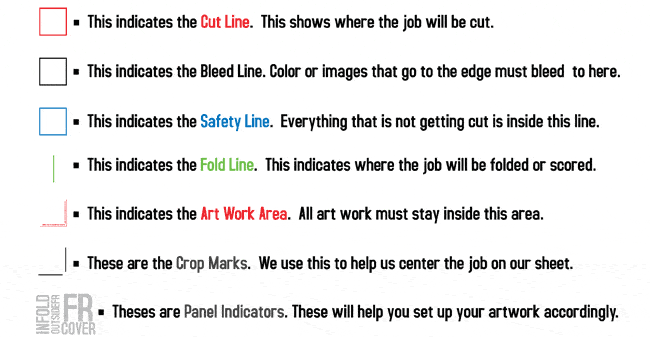
Here is what an 8.5×11 brochure template looks like:

These templates will help you identify where the cut line, bleed line, and safety line, are located along with other information so you can design your art correctly.
Some of our templates are labeled as OUT and IN. This means that there is some folding involved with the template. OUT means the FRONT of the job and IN means the BACK. During the upload part of your order, remember that OUT is the FRONT and IN is the BACK.
Here is an example of the fold-over business card template:

As you can see, OUT is the FRONT of the job and after folding, will be facing outward. You can also see the rotation of the job. The front must be positioned upside down so it can fold correctly.
Remember, do not move or change any part of the template when using them.
Digital quantities start from 25-250 and are printed on brand new, high tech digital equipment. These products are available at all of ArtShed’s locations nationwide, for your convenience.
ArtShed uses several digital printing technologies to continue to offer you great prices, quick turnarounds, and high-quality products. Many of our lower quantity marketing essential products, G4M products and products that have variable information are all printed using digital print technologies.
Tests show digital quality matches offset.
Digital printing offers larger color gamut.
Print buyers find digital quality interchangeable with offset quality.
Today, many showcase applications are printed digitally.
Digital printing is more affordable for short runs, due to very low set up cost.
Set up your files for digitally printed products the same way you would for an offset run. Our technology will ensure your files are optimized for output.
Bundling offers the convenience of sorting print orders into predetermined quantities for ease of use by you, your customers or for EDDM purposes. Orders will be bundled in quantities of either 50 or 100 pieces and they will be banded in accordance with USPS EDDM banding requirements.
Please Note:
Processing time for bundling your product may not be included in the turnaround time that you select when placing your order.
Please add 1 to 2 days to your turnaround time for this service.
The type of band we use may vary per facility subject to availability (Paper band shown below).
The maximum quantity offered for bundling is 25,000 pieces.
(Paper band shown below)
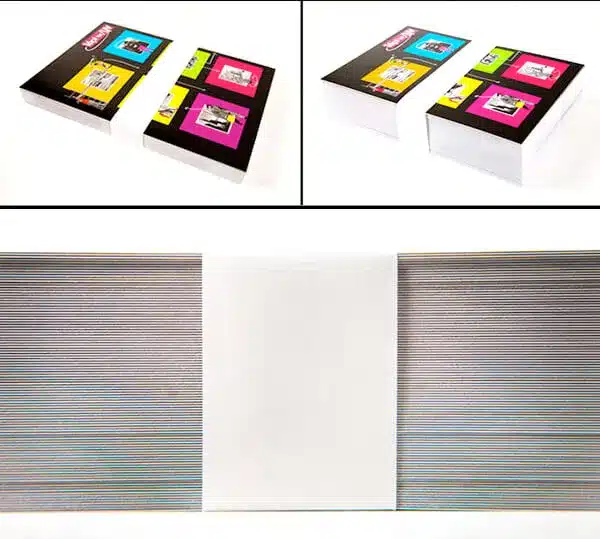
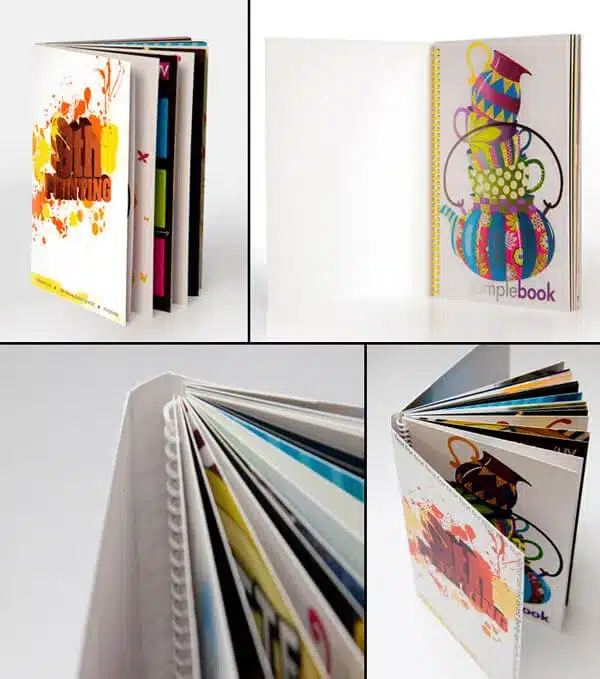
Create a professional presentation by customizing our sample book covers with your very own. You can customize these covers with your unique design, company and contact info.
Sample book covers are printed on 14PT stock with full color and attached to our unbranded Sample Books. The cover is UV coated on the outside only (this includes front and back cover) and uncoated on the inside. The Sample Books contain all paper stocks, finishing options, and sizes available on our site. Sample Book Covers follow the same rules as all other products. We recommend downloading our templates for the best results.
Rules and tips:
Avoid using dark colors to prevent cracking.
Sample booklets are printed on the outside only (front and back cover).
Use our template for the most accurate results.
Page layout and designs cannot be changed from the standard sample book. Only the cover can be customized.
Pictures below are samples of how the outside and inside booklet will look:
We recommend saving as a PDF file. You may also send the file in the following types: JPG, JPEG, TIF, TIFF, and EPS.
We prefer that you send PDF with embedded or outlined fonts. PDF files are easier to handle and will likely speed up your turn-around. Remember to flatten your files before uploading.
For Roll Labels, we recommend designing:
Vector files (e.g. EPS or PDF).
300 DPI or higher.
Use black (100% K).
For fine lines and text smaller than 9pt, use black (100% K) only.
Your designs should always start and finish in CMYK color mode.
These colors are in RGB

These are the same colors but in CMYK
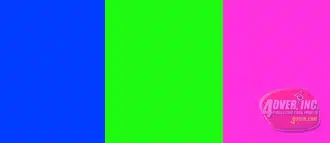
If you send us an RGB file, there is a chance that a color shift may occur and you may not be satisfied with your job.
Your artwork files should be at 300 dpi.
These are 72 dpi low res images

These are the same images but at 300 dpi

Low-resolution files may be printed as is or will be placed on hold until we receive new files, slowing your turn-around.
Bleed must extend past the cut-line and will be trimmed from the product during the final cutting phase. When the image is required to extend all the way to the edge, bleed is needed to preserve the finished look and the quality of the final product.
Please keep all text at least 0.125″ inside the cut-line.
The bleed for Standard Products is 0.125″.
The bleed for Booklets and Presentation Folders is 0.25″.
For Grand4mat Products, please see the G4Mat FAQs for individual substrate guides.
We recommend using our templates at all times.
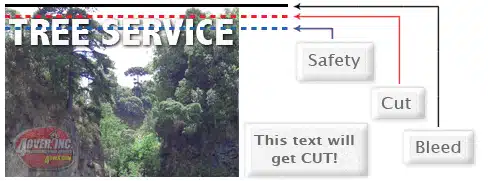
Yes, but if the border is too close to the cutline, it may be cut off-center slightly.

We cut through many sheets at a time, so watch your borders to avoid an unwanted mistake.
ArtShed requires Print Ready files with proper rotation. Files submitted are printed HEAD to HEAD as-is based off your files.
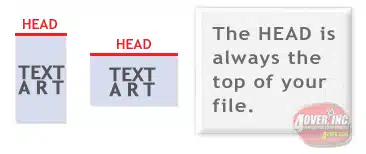
Make sure to set up your files so that when we print them HEAD to HEAD the final product will read the way you would like. Also, front and back files need to be set up either both sides vertically or both sides horizontally.

If you would like your back file to be upside down, please send your artwork as shown below.
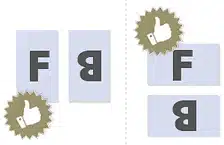
If you have a fold-over or greeting card, please send your artwork as shown.

For files not properly set up, ArtShed will use best judgment and will not be responsible for improper rotation.
When sending artwork, do not send extra files, like proofs or samples, because they might get printed. Only send the files you need printed.
DO NOT SEND THESE KINDS OF FILES
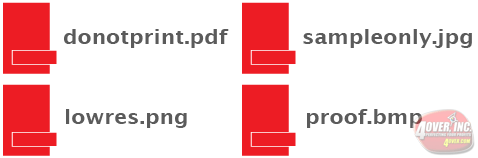
We are not responsible for these kinds of files being printed. Unless requested by one of our employees, DO NOT send files that you do not want printed.
We only except seperate files for each side of your job. Please note, if you send us both sides on the same artwork your job will not print correctly.
2 FILES – 1FR, 1BK / 1 FILE – FR&,BK
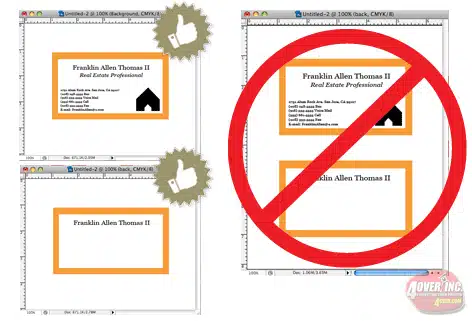
Any transparency issue can be resolved before saving your file.
What a transparency problem looks like on screen… After a transparency problem is printed…

To prevent this, never use shadows, glows, or any other transparency (image or otherwise) on top of a spot color. Always convert your spot color to CMYK and flatten before sending.
SHADOWS, GLOWS, TRANSPARENCY

All of these effects will cause transparency problems.
Primarily used to intentionally overlap inks for a number of reasons, overprint can cause unexpected results. We suggest that you turn all overprint objects off before submitting your files.
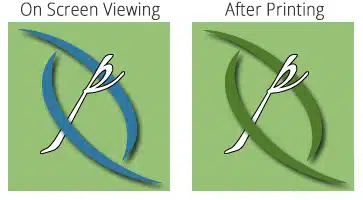
In this case, the logo was set to overprint. The colors in the logo are mixing with the colors in the background. Unexpected results may occur if you have accidentally set certain objects to overprint. Always check logos and other artwork before submitting.
White Type – Another common file setup error is using overprint for white type. If you are using white type and set it to overprint, it will result in the type “dropping off” the printed piece.
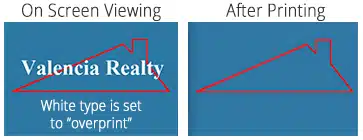
Our preflight system will give you a warning that indicates you have elements that are set to overprint. In order to prevent the type from dropping off in your printed piece, we recommend you turn off all type set to overprint. What can also solve this issue will be to flatten all the layers in your file and convert any Pantone and RGB colors to CMYK before submitting your files.
When using a blue in your design, always make sure to leave at least a 30% difference in your Cyan and Magenta .
100% C 100% M 0% Y 0% K
ON SCREEN

AFTER PRINTING

Blue is close to purple in the CMYK spectrum. Remember, use a low amount of magenta whenever using high amounts of cyan to avoid purple.
Example: C-100 M-70 Y-0 k-0
When exporting from any program such as Indesign or Illustrator, use these settings to make sure your PDF files export correctly.
Export settings for PDF files
Adobe PDF Preset is set to: Press Quality

Compatibility is set to: Acrobat 4 (PDF 1.3)

Compress Text and Line Art is set to: Off

We also have a PDF Preset (.joboptions file) to make it easy to create a ArtShed Print Ready PDF. Download the file, then double click. This will install a Preset into all Adobe products (Photoshop, Illustrator, Indesign, etc..) so you can choose it while saving your PDF. Click here to download.
PDF Preset
NOTE: Due to Adobe limitations, this preset will not convert all colors into CMYK. You must convert all colors to CMYK before saving your file.
Grayscale images that are converted to CMYK will have a color shift in the final print. That shift may be green or yellow.
Grayscale On Screen
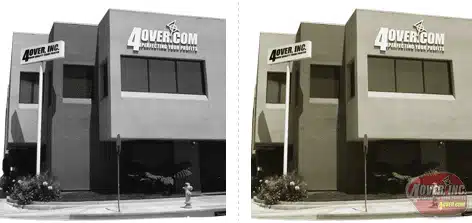
Grayscale After Print
Always check the CMYK of your grayscale in the final CMYK document. If there are other other than K in your grayscale image, there is a chance that the color will vary.
To eliminate all other than K, use your Channel Mixer (adjustment layer) in Photoshop, then click “Monochrome” and adjust accordingly.
Yes, in the Marketplace category.
Refers to the reinforced strip being on the left or right side.
Yes, if using the included water bag for stability on hard surfaces.
Black sleeve is a reinforcement option for single-sided flags; double-sided flags always have a black sleeve.
Use specific templates from the resource section.
Single sided has transparency on the back. Double sided uses two pieces with block-out material sewn together.
Width. Jumbo is 34 inches; Regular is 29 inches.
The advertised height is the pole hardware; installed flag height varies with tension.
X-Stand/Cross base for indoors; Ground-Stake/Spike for outdoors; 6ft Pole with wall bracket for Pole Flags.
No, flag material is 1.5 to 2 feet shorter than the total assembled height.
Yes, under normal conditions.
Keep text/graphics 0.5 inch from hem. 0.5 inch bleed on all sides. Use provided templates.
No, please do not send your artwork with crop marks or any other printer marks, including crop marks, registration marks, or color bars.
Tote Bag art files do not need bleed. Please submit your files at exactly 9″W x 13″H.
To help visualize setup and bleed rules, you can use our Tote Bag templates available here.
No. For all Tote Bags, the background color of your artwork must be transparent if you want the color of the bag to show. Saving a transparent PDF or TIF file is the best way to do this. You can also send in EPS files with no background.

For example, if you want a logo printed on a bag and your artwork contains the logo with a white background, or any background color, it will print as you see it on the file. The logo must be on a transparent background if you only want the logo to print.
Current acceptable file types are .pdf, .jpg, and .eps files.
Yes, 4/4 printing is available on both sides of the Tote Bag.
Our Tote Bags are printed by a CMYK+W digital print process.
Product size: 14.5″W x 16″H x 1″ / Printable area: 9″W x 13″H – both sides.
Natural (off-white)Blue (royal)and Red
We offer a sturdy 100% cotton Tote Bag that’s eco-friendly and useful for anything from grocery shopping to hitting the gym. The 6-oz cotton canvas material is washable and reusable. Dual self-fabric straps offer convenient over-the-shoulder carry, leaving hands free for shopping applications.
We cannot guarantee the locking pin will align precisely. If slightly off, you can correct the orientation accordingly when pinning to the fabric.
All of the different types of Button products follow the same rules as normal print ready artwork. The difference is in the safety areas. Each of the button products have the safety areas a bit different so we do recommend always using our certified templates to prepare your artwork. To download our templates, CLICK HERE.
A sample of our button product is included in our ArtShed Unbranded Loose Sample Pack. Complete our Sample Request Form to order your sample pack today.
Acceptable file types at the moment are .pdf, .jpg, and .eps files.
There are 2 different types of Buttons: Locking-Pin Buttons and Magnet Buttons. They are printed and produced in the same way but have different backers.Please note: our magnet backing buttons are meant for metal surfaces such as refrigerators, metal cabinets. They are not meant for apparel.
Buttons are printed by a CMYK digital print process. They are near photo quality.
No, please do not send your artwork with crop marks or any other printer marks, including crop marks, registration marks, or color bars.
The print area is 8.5×3 for the 11oz. Mug and 9×4 for the 15oz. Mug. It is then centered and wrapped around the mug.
To help visualize setup and bleed rules, you can use our Mug templates available here.
For White Mugs, the background color must be C-0 M-0 Y-0 K-0. White color for White Mugs will be ignored.
You can purchase one Mug through our trade site if you need samples for your customers. We do not offer free samples at this time.
The print area is 8.5×3 for the 11oz. Mug and 9×4 for the 15oz. Mug. It is then centered and wrapped around the mug.
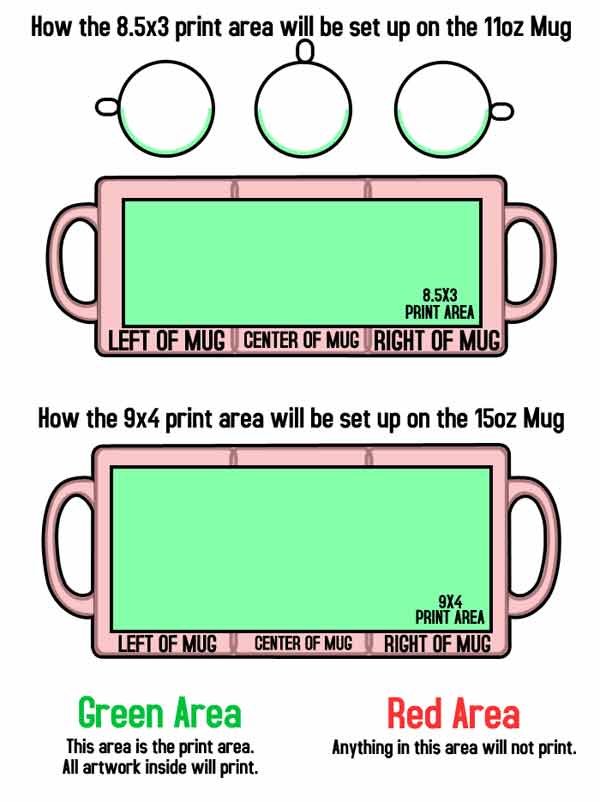
As you can see, the print area (GREEN) will be printed on the Mug. Anything outside that area (RED) will not be printed. Remember, the print area for the 11oz. Mug is 8.5×3 while the print area for the 15oz. Mug

Above is an example of offset position for Mugs. As you can see, you can achive a left, center, or right print by positioning the logo or artwork accordingly on the 8.5×3 document size.
Acceptable files types at the moment are .pdf, .jpg, and .eps files.
Mugs are printed by a CMYK digital print process.
Men’s – Basic, Tank Tops and Kids’ shirts are 6.0 oz (10.0 oz Canada) 100% Cotton Tubular Jersey. Classic fit, double-needle bottom hem and sleeves with shoulder-to-shoulder tape. Pre-shrunk to minimize shrinkage.Men’s Basic Short Sleeve reference: Alstyle #1301Men’s Long Sleeve reference: Alstyle #1304Men’s Tank Top reference: Alstyle #1307Kid’s Short Sleeve reference: Alstyle #3381Kid’s Long Sleeve reference: Alstyle #3384Men’s – Premium shirts are 4.3 oz (7.15 oz Canada) 100% Combed Ring-spun Cotton Jersey. Set-in rib collar with shoulder-to-shoulder taping. Double-needle sleeve and bottom hems. Preshrunk to minimize shrinkage.Men’s Premium Short Sleeve reference: Alstyle #5301Ladies’ – Premium shirts are 4.3 oz (7.15 oz Canada) 100% Combed Ring-spun Cotton Jersey. Set-in rib collar with shoulder-to-shoulder taping. Double-needle sleeve and bottom hems. Preshrunk to minimize shrinkage.Ladies’ Premium Short Sleeve reference: Alstyle #5562Ladies’ Premium Long Sleeve reference: Alstyle #5564
No. You may set up your artwork just like the normal mens T-Shirts.
Yes. Since the womens and youth size shirts are a bit smaller, your artwork must set up vertically only: Width = 8.5 Height = 11. Horizontal files are not accepted.
No, please do not send your artwork with crop marks or any other printer marks, including crop marks, registration marks, or color bars.
T-Shirt art files do not need bleed. Please submit your files at exactly 11″x8.5″ or 8.5″x11″.
To help visualize setup and bleed rules, you can use our T-Shirt templates available here
No. For all T-Shirts, the background color of your artwork must be transparent if you want the color of the garment to show. Saving a transparent PDF or TIF file is the best way to do this. You can also send in EPS files with no background.

For example, if you want a logo printed on a garment and your artwork contains the logo with a white background, or any background color, it will print as you see it on the file. The logo must be on a transparent background if you only want the logo to print.
You can purchase one T-Shirt through our trade site if you need samples for your customers. We do not offer free samples at this time.
There are two available print areas, 11″x8.5″ and 8.5″x11″. Both are centered 2″ down from the bottom of the collar for the front, and 5.5″ down from the top of the collar for the back.

As you can see, the print area (GREEN) will be printed on the shirt. Anything outside that area (RED) will not be printed.

Above is an example of offset position for T-Shirts. As you can see you can achieve a left or right side chest print by positioning the logo or artwork accordingly on the 11″x8.5″ document size.
Current acceptable file types are .pdf, .jpg, and .eps files.
Yes. If you would like to order printing only on the back, please choose 0/4 under the color option.
Our T-Shirts are printed by a CMYK+W digital print process and can be printed on the front and back of the T-Shirt.
We offer various types of T-Shirts, made from 100% cotton. Our current selection of colors include: White, Black, Red, Blue and Gray. Adult sizes range from S to XXL. Kids sizes range from XS to XL. (NOTE: Ladies Short and Long Sleeve T-Shirts are Slim Fit)
Unlike our Low Tac Wall Graphics, ArtShed Bumper Stickers use a strong permanent adhesive. We do not recommend removing them once they’ve been applied.
Yes, ArtShed Bumper Stickers are intended for use on car bumpers and are resistant to even the harshest weather conditions. Outdoor application will not result in product damage.
Perfect for outdoor use, our ArtShed Bumper Stickers are printed on 4mil premium white flexible vinyl film and coated with acrylic adhesive that’s laminated to a 90# layflat liner. The film is designed to accept a variety of solvent based and curable inks. The liner offers excellent product layflat, adhering easily to most bumpers and enabling them to withstand a variety of environmental conditions. So go ahead and hit the streets with your brand, full speed ahead!
Create your artwork using a vector based software program such as Adobe Illustrator, InDesign or Corel DRAW. Save or export your files as EPS or PDF. Outline or embed your fonts to avoid font substitution issues. For your print ready PDF files, you can download our Save As PDF Preset tool.
We recommend designing Barcode and QR code images using 100% K (black) only to assure clear quality and prefer vector files.
Make sure to design with 100% K (black) . Small text that is 9pt or lower must be 100% K only. Your image resolution should be 300 DPI or higher. Design vector files. Recommended file types are EPS or PDF with a vector base.
Semi-Gloss without lamination and Eggshell Felt can easily be written on with a ball point pen. Permanent markers work on all substrates and on laminated roll labels, if allowed to fully dry. You may not be able to write on roll labels with gel, ink or other types of pens, nor can you write with pencil. It is recommended that you test your specific application.
Overlaminating helps maximize label protection, adding extreme temperature and abrasion resistance, as well as protection from chemical exposure. Overlaminating is also an aesthetic enhancement with both Silk and Gloss options.
For some substrates, we offer either a 1.0 mil clear silk overlaminate or a 1.0 mil clear gloss overlaminate.
We recommend using an 8 point font or larger on all Bright Metallic Roll Labels in order to avoid thin lines which could result in poor ink adhesion or registration.
When any CMYK colors overlap the white mask areas, we recommend adding a stroke that’s between 1 and 2 pixels larger than the underlying white elements.
If selecting our 5/0 option, a white mask will be required. Please refer to the question above (How do I set up and create a Bright Silver Metallic or Clear Roll Label with white ink?) for instructions on how to set up your white ink file.
Bright Silver Metallic – 2mil* stock is durable with a chemical resistant topcoat. As they are not oil and water resistant, they are recommended for indoor use.
Clear BOPP – 2.3mil stock is oil and water resistant but is only recommended for indoor use.
70lb Eggshell Felt – 70lb is manufactured with wet strength properties to increase performance in moist environments and is recommended for indoor use.
Semi-Gloss – 55lb stock is NOT oil and water resistant and is only recommended for indoor use.
White BOPP – 2.3mil stock is oil and water resistant but is only recommended for indoor use.
All square and rectangle shapes come with industry standard 1/8 inch rounded corners for easy removal from the liner.
Roll Labels are suitable for use with food products and items that may come into contact with moisture/humidity/water/condensation only when an intervening layer of FDA approved food-contact material is used. This additional layer helps the label to adhere more securely making it less likely to present issues. It is the responsibility of our customers or the end-user to ensure that use of the products conform to the relevant FDA regulations.
With Clear Labels, you have the option to use white ink as your base color so your prints can be opaque in some areas and transparent in others. With Bright Metallic Silver, white ink will hide the foil material to make solid colors.
Similar to Spot UV masks, White Mask files are separate from your artwork files and Black color indicates where the white ink will print.
Make sure to create your mask file the same size as your color art file. This will prevent alignment issues during printing.
Note: White Masks must be made in vector form as shapes and be saved as EPS or PDF.
Use vector paths/shapes to create black color areas that will indicate where the white ink base will go. The rest of the area will represent the Metallic or Transparent label stock.
Here is a sample of a printed clear label with white ink. First how the artwork and white mask files look like, then a printed piece from these files:

Here is a sample of a Bright Metallic Silver label with white ink. First how the artwork and white mask files look like, then a printed piece from these files:


Black in the white mask file indicates where white ink will be printed. Remember the following when creating a white mask for your white ink base:
* White ink base will be printed behind any color that’s in your Artwork Layer.
* Areas with color but without a White Mask will be printed with color directly on the material. This means Clear stock will have transparent color and Metallic stock will have Metallic color.
* Areas with color and a White Mask will be printed as opaque or solid color.
* Areas with a White Mask and no color will be printed as white.
The Unwind Direction is simply the direction in which a label unwinds from a roll.
Our Roll Labels are very high quality but the print may not be as sharp as it is with Offset – you may lose some quality, particularly with images. Try to keep all images above 300 dpi.
All of our Roll Labels have a 3″ core and an outer diameter of up to 6″. This will fit most hand-applied dispensers – please check the specifications of the dispenser prior to purchase if you’ll be using our Roll Labels with any other dispenser.
Yes, Custom Shaped Roll Labels are available for the following sizes: 1″ x 1″, 2″ x 2″, 3″ x 3″, 4″ x 4″, 5″ x 5″ and 6″ x 6″. Choose from the size that best fits your needs, then select the Shape Option: Custom Roll Label. On the upload page you will be asked to upload the Front Artwork file and the Custom Shape File.
Custom Roll Label File Guidelines:
Custom shape file must be created a vector and saved as an EPS or PDF
Custom shape file should represent the cut line
Custom shape file should be a black line, 0.5pt to 1pt thick
Thin lines and small shapes are not recommended
Shapes smaller than 1/8″ may have unexpected results and are not recommended
Bleed for Roll Labels is 0.125″ from the cut line on all sides
Example of Custom Roll Label:

Our Roll Labels are available in the following standard shapes: Oval, Circle, Square (with Round Corners) and Rectangle (with Round Corners) . Custom Shapes are also available for the following sizes: 1″ x 1″, 2″ x 2″, 3″ x 3″, 4″ x 4″, 5″ x 5″ and 6″ x 6″.
All of our Roll Labels have a 3″ core and an outer diameter of up to 6″.
Bright Silver Metallic – 2mil
Bright Silver Metallic comes standard in a 2mil thickness. Offering excellent tear strength and opacity, these mirror-like labels are heat and chemical resistant and are suitable for application on a variety of surfaces. We recommend them for indoor use. We offer white ink as a 5th color. Please see FAQ #9 below for details on how to set up your artwork with white ink prior to uploading.
Clear BOPP – 2.3mil
Clear BOPP is made of Glossy Clear Biaxially Oriented Polypropylene with a permanent adhesive that sticks well to a variety of surfaces. BOPP is oil and water resistant but we only recommended it for indoor use. We offer white ink as a 5th color. Please see FAQ #9 below for details on how to set up your artwork with white ink prior to uploading.
Eggshell Felt – 70lb, 6.3mil
70lb Eggshell Felt features a distinct texture, high opacity and excellent ink holdout. This facestock also contains 30% post consumer waste content making it an excellent choice for eco-friendly applications. It is manufactured with wet strength properties to increase performance in moist environments. These are not recommended for outdoor use. We recommend that you test your specific application.
Semi-Gloss Paper – 55lb, 3.2mil
Semi-Gloss Paper is a budget friendly solution that doesn’t sacrifice quality for economy. Semi-Gloss Paper stock has a permanent adhesive that sticks well to a variety of surfaces. It is not resistant to oil or water and is recommended for indoor use only.
White BOPP – 2.3mil
White BOPP is made of Glossy White Biaxially Oriented Polypropylene with a permanent adhesive that sticks well to a variety of surfaces. White BOPP is oil and water resistant but we only recommended it for indoor use.
For drop-ship orders, if a package is deemed undeliverable and returned by the shipping carrier, it will be returned to you (the sender) and not to ArtShed. A return-delivery fee will apply.
If the address supplied is not valid or complete, the carrier will make every reasonable effort to find the correct address and deliver the shipment. An additional address correction fee of $11 will be charged for this service. Please ensure that your address is up-to-date in your Address Book and includes ALL the necessary information such as the correct Street address, APT/suite/other number, town or city, state and zip or postal code.
Our web site is equipped with an address verification system that checks all addresses for accuracy depending on the carrier being used. This assures your package will arrive to the correct location. Please make sure that the address is spelled, abbreviated and submitted with the correct suite, unit, street number, town or city and zip or postal code.
All international customers are responsible for paying the custom fees (i.e.: taxes, duties, etc.) upon receiving the order. ArtShed Inc. will only charge our customers for shipping fees.
The order will be produced at a US plant, the shipping charge includes all fees, duties, etc. See below for more details.
The order is shipped from a U.S.plant, please allow 4-7 business days from the date your order is shipped. Duties (if applicable), fees and Canadian taxes will be included in your order total. There are no fees or taxes on orders below $20.01 Canadian Dollars.
Yes, ArtShed offers shrink wrapping for certain products. If the option is availalbe for the product and size you’ve selecte, you will be able to select it.
Generally no, but ArtShed does offer group shipping on limited products. Please review the Shipping terms before choosing group shipping as turnround times and delivery may be impacted.
Unfortunately at this time, we do not offer that option. All orders must be shipped out using our ArtShed shipping account.
Unfortunately at this time, we do not offer that option.
We offer Common Carrier shipping with multiple service methods e.g. Ground, Next Day Air, etc. We also offer Freight shipping based off quantity.
We do not provide a pricing or weight list but you may get immediate shipping pricing on our website when placing an order.
It depends on your shipment’s origin and destination and the service option you choose. With Priority Freight, your shipment will typically arrive within one to three days. With Economy Freight, it will typically arrive within three to six days.
Note: Priority and Economy Freight do not guarantee transit times.
When certain orders are large enough to qualify for freight shipping, freight shipping will be listed in the available Shipping Methods on the product page.
Freight – No Liftgate
The delivery truck will come to your business or home. You will be entirely responsible for removing the pallet from their truck. This option is only recommended for businesses with a forklift or standard 48″ high dock w/ pallet jack.
Freight – With Liftgate
The delivery truck will come to your business or home. They will lower the pallet to the ground on a lift gate. You will be entirely responsible for moving the pallet yourself. This option is only recommended if you have a pallet jack or forklift.
Freight – Inside Delivery
The delivery truck will come to your business or home. They will lower the pallet to the ground on a lift gate and move the pallet inside to ground level. If you need it delivered to a higher floor, you must have a FREIGHT elevator.
Yes. We can drop ship a package to your customer. Simply select the option Drop Ship then select an address from your Address Book. The order will now ship with your billing address or you can update the ship from address by clicking on edit and it will be shipped to the address chosen from your address book.
You cannot split a single order of one qty into two different qtys. For example, if your order is 10k, you would not be able to split the order into two 5k shipments. To achieve this, you would have to order two different sets of 5k.
Yes we ship to PO Box addresses, but there size restrictions.
Yes, if you are eligible for Pick-up and Local Delivery you will see the options, along with flat rate shipping and the remaining UPS shipping methods.
Flat rate shipping prices apply to all ArtShed.com customers, including API customers.
Yes, flat rate shipping applies to all Business Card categories.
The shipping method will be UPS Ground Shipping. It does not apply to shipments going to Hawaii, Alaska, Puerto Rico, and international shipping.
Flat rate shipping applies to all turnaround times that are available for Business Cards.
Flat Rate Shipping will be available on all business card products with a quantity of 5000 or less.
25 – 5000 quantities will be $10 flat rate ground shipping.
The new flat-rate shipping for business card products on ArtShed.com offers customers greater cost predictability and savings. By simplifying shipping costs across quantity ranges, businesses can budget more effectively and enjoy consistent, affordable ground shipping. This streamlined approach enhances convenience and ensures that customers, regardless of loyalty level or API use, benefit from competitive shipping rates for their business card orders.
*Residential Delivery Fees May Apply: Some addresses are classified as residential by UPS and may include an additional fee.